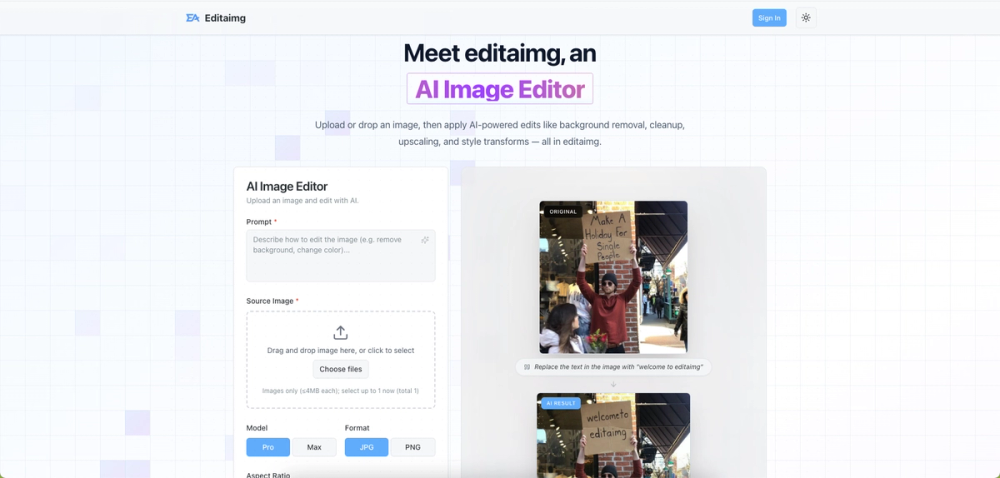
Editaimg is an advanced AI Image Editor designed to simplify and enhance photo editing for everyone, regardless of their professional skills. This powerful tool allows users to effortlessly transform images with AI-powered capabilities, offering a seamless workflow from upload to export.
Key features and functionalities include:
- AI-Powered Editing: At its core, Editaimg leverages artificial intelligence to perform complex image manipulations with ease. Users can apply a wide range of edits such as background removal, intelligent cleanup (inpainting), resolution upscaling, and promptable style transformations. This means you can describe your desired edit in natural language, and the AI will execute it.
- Style Transforms: Instantly apply artistic styles, adjust color grading, and fine-tune lighting to dramatically alter the mood and aesthetic of any image. This feature is perfect for creative professionals and casual users looking to give their photos a unique touch.
- Object Replacement: Subtly or significantly change elements within your images. Whether you need to swap a coffee cup for a teacup or replace any other object, Editaimg makes precise alterations simple and realistic, ensuring your creative vision is perfectly matched.
- Realistic Product Shots: Ideal for e-commerce, the AI Image Editor can transform basic product photos. You can take an item with a plain background, like a soap dispenser, and seamlessly place it into a realistic setting, such as a kitchen sink, generating professional-grade product visuals instantly.
- Unwanted Object Removal: Clean up your photos by effortlessly removing distracting elements. This includes erasing people from travel photos, eliminating utility poles from landscapes, or clearing trash from a beach scene. The AI intelligently reconstructs the background, leaving you with a clean and uncluttered image.
- Instant Previews & One-Click Export: The platform provides instant previews of your edits in a clear grid format, allowing for quick review. Once satisfied, images can be downloaded or shared with a single click, supporting popular formats like JPG and PNG.
- Non-Destructive Editing: All edits are applied non-destructively, preserving your original image while allowing for iterative adjustments and experimentation.
The workflow is straightforward:
- Import your image: Drag and drop your file directly into the editor.
- Describe your idea: Use the prompt box to articulate the desired edit.
- Choose settings: Fine-tune options like aspect ratios, file formats, and style strength.
- Generate your edit: Click 'Edit' to see your photo transformed in seconds.
Editaimg is designed for anyone seeking professional-level image editing results without needing extensive graphic design skills, making advanced photo manipulation accessible and efficient.