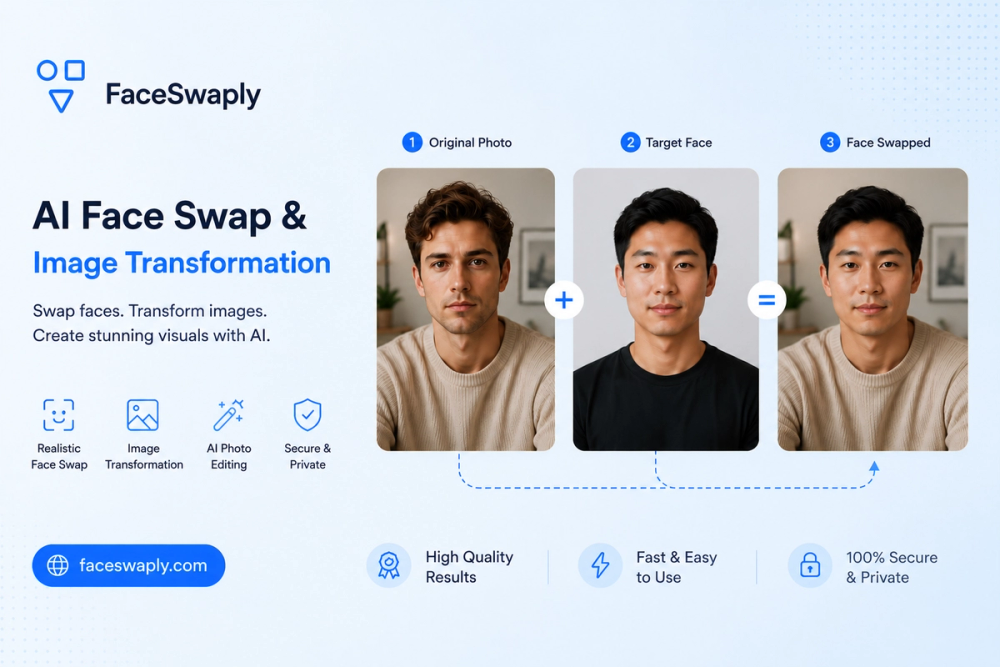
FaceSwaply is an advanced online platform specializing in AI-powered face swaps and comprehensive image transformations. It allows users to realistically swap faces in photos and videos, offering a seamless experience for generating new visuals without complex editing software. The platform's core functionality revolves around its intuitive two-image workflow: upload a source face and a target photo, then generate and download a natural-looking, face-swapped result.
Beyond basic face swapping, FaceSwaply extends its capabilities to a suite of AI photo tools designed for various creative and professional needs. These include:
- Face Swap AI: Easily swap a source face into a target photo.
- Video Face Swap: Integrate a face image into a target video using an asynchronous workflow.
- AI Headshot Generator: Transform a portrait into a professional headshot suitable for LinkedIn, resumes, and business profiles.
- AI Hairstyle Generator: Experiment with new hairstyles and hair colors by previewing them on your portrait before making real-world changes.
- Restore Face: Repair blurry, old, or AI-generated faces to improve image quality.
- Restore Image: Fix old, scratched, faded, or damaged photos.
FaceSwaply is built for practical image transformation outputs, enabling users to create profile photos, social media visuals, campaign drafts, avatar-style concepts, and even explore dress-up ideas. The platform emphasizes a "photo-first" approach, directing users to specific transformation tools based on their intent, rather than a generic editor. This ensures a focused and efficient user experience.
The process for using FaceSwaply's core face swap feature is straightforward:
- Upload a source face: Select a clear, well-lit image of the face you wish to transfer.
- Upload a target photo: Provide the photo where the new face should be placed, maintaining the original pose, scene, and framing.
- Generate and download: Initiate the face swap, preview the AI-generated image, and download the final result.
FaceSwaply aims to democratize advanced image editing, making it accessible to individuals who want to transform existing images without needing expertise in heavy photo editing software. For optimal results, especially with face-centered tools, it's recommended to use sharp portraits where facial features are clearly visible. The platform also offers free credits to start, with various paid plans for more extensive use, including commercial rights for generated outputs.