Genjutsu
Your photo. A new starring role in trending clips.
Overview
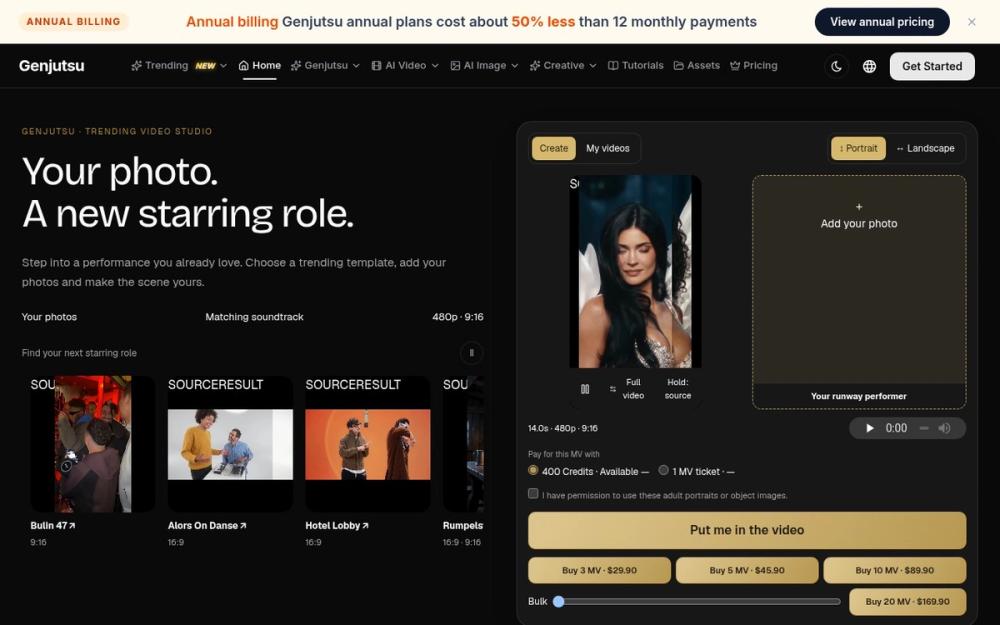
Genjutsu is a web app for motion transfer and template remixes with your own reference photos. It runs in the browser, so there is nothing to install. Visit https://genjutsu.tv/ to explore the product and see what it can do before you create anything.
Key Features
- Video motion transfer using reference images
- Object, character and outfit replacement
- 480p, 720p and 1080p output options
- Reusable source video and ordered image workflows
- Labeled source vs remix comparisons
Use Cases
- Social media posts and short shareable clips
- Creative experiments and concept work
- Quick content for small teams and solo creators
Getting Started
- Open https://genjutsu.tv/ in your browser.
- Explore the available options and examples.
- Prepare clear inputs such as sharp, well-lit photos.
- Review the format and any cost shown, then create.
- Download and share your result.
Pricing & Plans
Freemium: browsing is free; creation uses MV tickets or credits. See the pricing page on the site for current packs and plans.
Who Is It For?
Creators, marketers and hobbyists who want a straightforward way to make AI-assisted media without a steep learning curve.