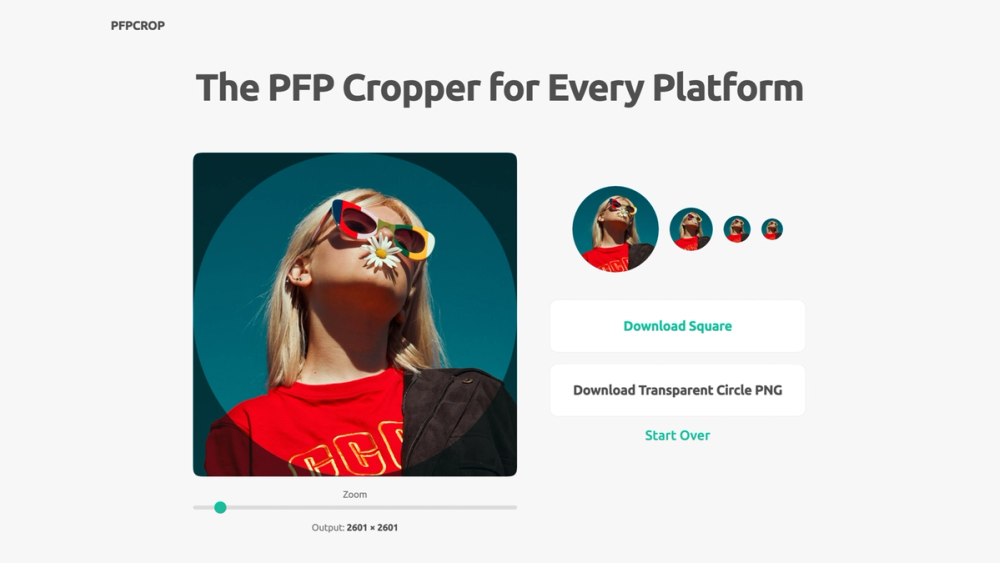
PFP Cropper is a free browser-based tool for creating profile pictures and avatars. Upload a photo, drag it into position, zoom to choose the framing, and download a square image or a transparent circular PNG. Live previews show how the result will look on Discord, TikTok, LinkedIn, and Facebook before you save it. The cropper works entirely in your browser, so photos are not uploaded to a server. There is no signup, watermark, or resolution limit. It supports file upload, drag and drop, and pasting an image from the clipboard, and it works on desktop and mobile.
Pick a file, paste it, or drop it anywhere on the page. Drag to frame your face. The platform preview updates live, so you see exactly how your avatar will look before you download. When the framing looks right, download the result at full resolution in square format, ready to upload anywhere.
For platform avatars, upload the square image. Platforms such as Discord and TikTok cut the circle themselves, and a full square works with every crop shape. Download the transparent circle PNG only when you need a round image for your own website, slides, documents, or stickers.
The dedicated round image cropper turns a photo into a circle without uploading anything to a server. Drop in a picture, drag it into place, zoom until the framing looks right, and download the circular image as a transparent PNG at full resolution. It keeps the full resolution of the source crop, so the result stays sharp. No signup, no watermark, and it works the same on a phone as on a desktop.