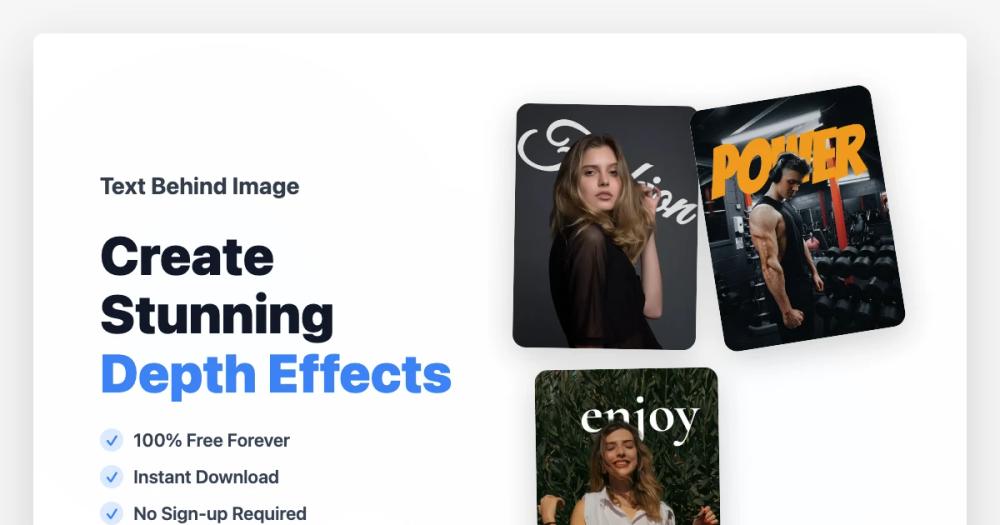
Text Behind Image is a powerful, 100% free, and AI-powered online editor designed to help users create stunning text-behind-image art effortlessly. This innovative tool allows you to add text behind subjects in your photos, producing professional-looking depth effects without requiring any design skills or complex software like Photoshop. It's completely free to use, requires no sign-up, and delivers instant, high-quality downloads without watermarks.
Key Features:
- AI-Powered Object Detection: The core of Text Behind Image lies in its advanced AI, which automatically identifies and segments objects and people within your uploaded images. This intelligent detection enables the seamless placement of text behind foreground elements, creating a natural and impressive depth effect without any manual masking or intricate editing.
- Custom Fonts & Text Styling: Users have extensive control over their typography. You can choose from a variety of font families to match your aesthetic, and fine-tune text properties such as size, color, opacity, and rotation. Additionally, the tool offers stroke effects to make your text stand out, allowing for truly unique and personalized designs.
- Real-Time Preview & Editing: The editor provides an intuitive, real-time editing experience. As you type and adjust your text, you can instantly see the changes reflected on your image. The drag-and-drop functionality allows for easy repositioning and resizing of text, ensuring you can fine-tune every detail to achieve the perfect composition.
- High-Resolution Export: Once your masterpiece is complete, you can download it in crystal-clear PNG or JPG format. The high-resolution output ensures that your creations are suitable for a wide range of applications, from sharing on social media platforms to printing as posters or incorporating into marketing materials.
- 100% Free, No Watermark: Text Behind Image is committed to being a completely free resource. There are no hidden costs, no subscription fees, and absolutely no watermarks on your downloaded images. This allows for unlimited creativity and usage without financial barriers.
- Preset Font Collections: For those looking for quick and professional results, the tool offers carefully curated font presets. These collections are optimized for depth effects, allowing users to apply sophisticated typography styles with just one click, ensuring they blend perfectly with layered designs.
How It Works in 3 Easy Steps:
- Upload Your Image: Simply select any photo from your device. The tool supports common image formats like JPG, PNG, and WEBP, with a maximum file size of 10MB. For best results, use images with clear subjects or distinct foreground objects.
- Customize Your Text: Type in your desired text. The AI will automatically work its magic, positioning the text behind the detected objects. You can then further customize the font, size, color, rotation, and exact placement to achieve your desired depth effect.
- Download High-Quality Result: Instantly preview your final design. Once satisfied, download your creation in high-resolution PNG or JPG format. Enjoy your watermark-free image, ready for any purpose.
Text Behind Image is ideal for content creators, marketers, social media enthusiasts, and anyone looking to add a creative and professional touch to their photos quickly and easily.