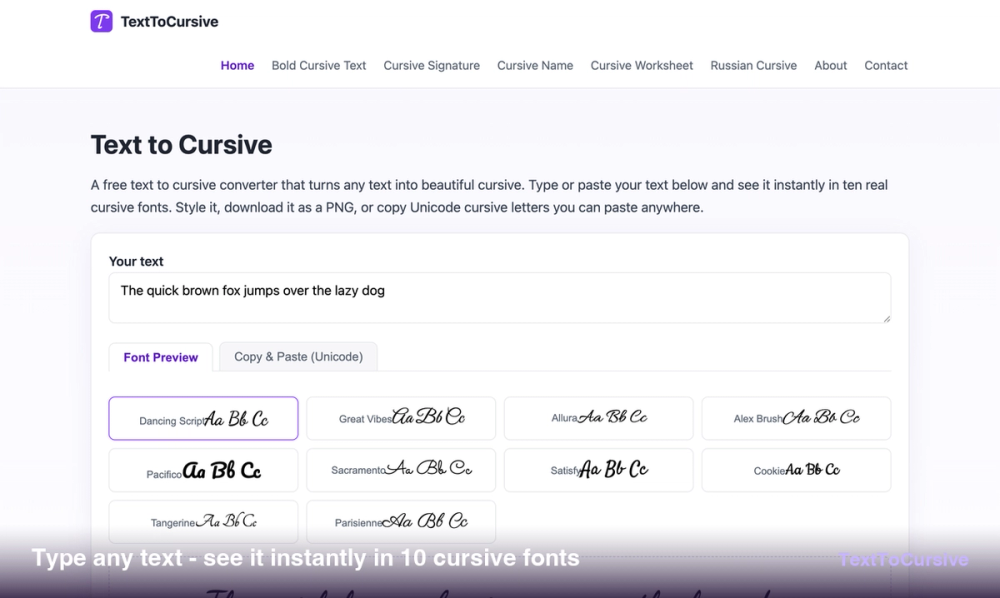
Text to Cursive is a comprehensive online tool designed to transform plain text into elegant cursive styles, offering both high-quality image exports and versatile copy-paste Unicode characters. This free, browser-based converter requires no sign-up and processes all text locally, ensuring user privacy and instant results.
The platform provides two primary modes for cursive conversion:
-
Font Preview (PNG Export): This mode allows users to preview their text in ten distinct, open-licensed cursive fonts, such as Dancing Script, Great Vibes, Allura, and Pacifico. Users can customize various aspects of the text, including font size (32-96px), line height, letter spacing, text alignment (left, center, right), and text/background colors. A transparent background option is available for PNG exports, making it ideal for logos and overlays. The tool supports high-resolution PNG downloads (up to 2x scale) with adjustable maximum text width and padding, ensuring print-ready quality. This feature is perfect for creating professional-looking text for wedding invitations, custom logos, printable worksheets, and decorative print materials.
-
Copy & Paste (Unicode): For applications that do not support custom fonts or image embeds, this mode converts text into 19 different Unicode cursive styles. These characters behave like plain text, allowing them to be pasted into social media bios (Instagram, TikTok, X/Twitter), Discord nicknames, WhatsApp messages, and other text fields. The website clearly explains the distinction between real cursive fonts (which offer true ligatures and continuous strokes) and Unicode characters (which are isolated symbols with potential display issues on older devices), guiding users to choose the appropriate method for their needs.
Key features of Text to Cursive include:
- Dual Conversion Modes: Offers both real font rendering for images and Unicode character conversion for copy-pasting.
- Extensive Font Library: Features 10 popular cursive fonts for image generation and 19 Unicode styles.
- Customization: Granular control over font size, spacing, alignment, and colors for PNG exports.
- High-Resolution Output: Download 2x resolution PNG images suitable for print and digital design.
- Privacy-Focused: All text processing occurs client-side in the browser, with no data uploaded or stored.
- Completely Free: No hidden costs, subscriptions, or usage limits.
Beyond the core text-to-cursive functionality, TextToCursive.com also hosts a suite of specialized cursive tools:
- Bold Cursive Text Generator: For creating bolder Unicode cursive characters.
- Cursive Translator: To convert styled Unicode text back to plain letters or vice-versa.
- Cursive Tattoo Font Generator: For comparing tattoo-ready scripts and downloading transparent PNGs.
- Cursive Signature Generator: To create elegant cursive signatures as transparent PNGs for emails and documents.
- Cursive Name Generator: For comparing names in various fonts or generating name cards.
- Cursive Alphabet Chart: An interactive chart for learning and practicing cursive letters.
- Cursive Number Generator: For generating cursive digits and dates.
- Cursive Worksheet Generator: To create printable tracing worksheets with four-line guides for educational purposes.
- Russian Cursive Generator: Specifically for Cyrillic text in authentic Russian handwriting fonts.
Text to Cursive serves a wide audience, from individuals looking to personalize social media profiles to designers creating invitations and educators preparing learning materials. Its intuitive interface and robust feature set make it a valuable resource for anyone needing to generate or utilize cursive text.