Overview
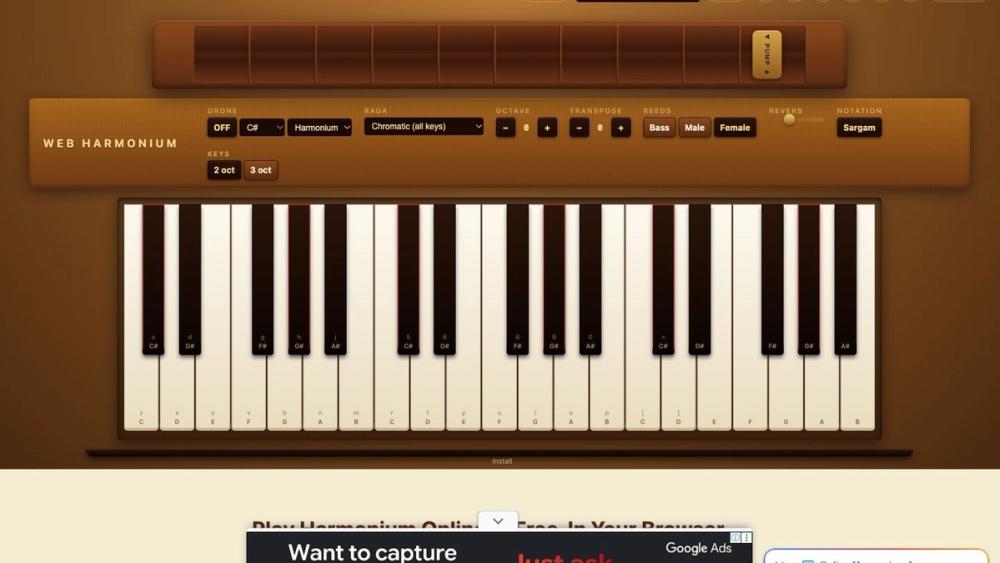
Web Harmonium (web-harmonium.app) is a free online Indian harmonium that runs in a web browser. There is nothing to download and no account to create before you play. You can play it with your computer keyboard, a mouse, a touchscreen, or a USB or Bluetooth MIDI keyboard. The instrument has a bellows you drag to control volume, a drone that can sound as harmonium reeds or as a tanpura, twelve raga presets that dim the keys outside the chosen scale, and a switch between Western note names and Indian sargam.
The sound comes from real harmonium recordings rather than synthesis. The samples are public domain (CC0) recordings made at Yale's Euterpea Studio. There are nine sampling points spread across three octaves, and Tone.js fills in the notes between them in the browser. Next to the instrument, the site has a beginner's guide, a sargam reference, a chart of harmonium notes, raga guides, and a small library of song notes. Each song in that library has been cross-checked against several independently published notations before it was added.
The site says it is built and maintained by one person. It has no subscription, no paywall, and no premium tier.
Key Features
- Real harmonium samples. CC0 recordings from Yale's Euterpea Studio, with nine sampling points from about C3 to C5 (one every three semitones or so), played back through Web Audio with Tone.js. Extra reeds are layered with chorus to imitate the slightly detuned reed banks of a physical harmonium.
- Draggable bellows. A handle on top of the instrument controls volume, and dragging it further right makes the sound louder, as pumping does on a real harmonium.
- Drone. You can turn on a Sa–Pa drone in either Harmonium mode (sustained reeds) or Tanpura mode (a plucked Sa–Pa–Sa–Sa cycle, synthesized). The drone root can be set to any of the twelve keys.
- Twelve raga presets. Bilawal, Yaman, Khamaj, Kafi, Asavari, Bhairavi, Bhairav, Bhupali, Malkauns, Marwa, Todi, and Puriya Dhanashree. When you pick a raga, out-of-scale keys are dimmed so they are easy to avoid.
- Sargam or Western notation. One button switches key labels between C D E and Sa Re Ga Ma. Sargam is relative, so the labels move when you change the drone root, and a gold marker shows where Sa is.
- Front-panel controls. Octave, transpose, reeds (Bass, Male, Female), reverb, sustain, and a choice of a 2-octave or 3-octave keyboard.
- MIDI input. USB and Bluetooth MIDI keyboards are detected automatically and respond to velocity. A footer indicator turns green when a device is connected.
- Keyboard shortcuts. A QWERTY note layout covering lower, middle, and part of the upper octave. Space works as a sustain pedal, and Alt shortcuts handle drone, reverb, fullscreen, theme, record, volume, transpose, and octave. A keymap cheatsheet is one click away.
- Preset songs. A menu plays songs such as Happy Birthday, Om Jai Jagdish Hare, Jana Gana Mana, and Vande Mataram on the on-screen keys.
- Recording and sharing. Takes of up to two minutes download as WebM audio files. If you sign in with Google, you can save a recording to the cloud and get a shareable link. A separate share link copies a URL that keeps your current settings (raga, drone root, octave, reeds).
- Mobile and PWA. It works in mobile browsers on iPhone, iPad, and Android, with multi-touch for chords. You can add it to your home screen, where it opens full-screen and keeps working offline after the first load.
Use Cases
- Daily sargam practice. Turn on the tanpura drone, show sargam labels, and sing or play the scale up and down against Sa and Pa. This is the exercise the beginner's guide walks through.
- Exploring ragas. Choose Yaman, Bhupali, or Malkauns and improvise while the keys outside the raga stay dimmed.